


In the realm of web development, Webpack has emerged as a powerful and widely - used module bundler. Among its many loaders, the Sass loader holds a special place. As a loader supplier, I'm here to delve deep into what a Sass loader in Webpack is, its functionality, and why it's an essential tool for modern web projects.
Understanding Webpack and Loaders
Before we jump into the Sass loader, it's crucial to understand the concept of Webpack and loaders in general. Webpack is a static module bundler for modern JavaScript applications. When Webpack processes your application, it recursively builds a dependency graph that includes every module your application needs, then packages all those modules into one or more bundles.
Loaders in Webpack are transformations that are applied on a resource file of your application. They allow Webpack to handle different types of files, not just JavaScript. For example, you can use loaders to convert CSS files into JavaScript modules, or to transform TypeScript code into plain JavaScript.
What is a Sass Loader?
Sass (Syntactically Awesome Style Sheets) is a CSS pre - processor that extends the capabilities of regular CSS. It introduces features like variables, nesting, mixins, and inheritance, which make writing and maintaining CSS much more efficient and organized.
A Sass loader in Webpack is a specific type of loader that enables Webpack to process Sass or SCSS (Sassy CSS) files. SCSS is a superset of CSS, meaning that any valid CSS file is also a valid SCSS file. When you use a Sass loader, Webpack can take your Sass or SCSS files, compile them into regular CSS, and then incorporate that CSS into your application's bundle.
How Does a Sass Loader Work?
The Sass loader works in conjunction with other loaders in a Webpack pipeline. Typically, it is used in combination with the style - loader and css - loader.
- Sass Compilation: The Sass loader first takes your
.scssor.sassfiles and compiles them into regular CSS. It uses a Sass compiler, usuallynode - sassordart - sass, under the hood to perform this conversion. For example, if you have a Sass file with variables and nesting like this:
$primary - color: #007bff;

body {
    color: $primary - color;
    p {
        font - size: 16px;
    }
}
The Sass loader will compile it into the following CSS:
body {
    color: #007bff;
}

body p {
    font - size: 16px;
}
-
CSS Loading: After the Sass file is compiled into CSS, the
css - loadercomes into play. Thecss - loaderinterprets@importandurl()likeimport/require()and resolves them. It takes the compiled CSS and turns it into a JavaScript module that can be imported into your JavaScript files. -
Style Injection: Finally, the
style - loadertakes the JavaScript module generated by thecss - loaderand injects the CSS into the DOM by creating a<style>tag in the HTML document. This way, your application can display the styles correctly.
Why Use a Sass Loader in Webpack?
-
Modularity: Webpack allows you to break your application into smaller, more manageable modules. With a Sass loader, you can also modularize your stylesheets. You can create separate Sass files for different components or sections of your application, and Webpack will handle the compilation and bundling process for you.
-
Efficiency: Sass provides features like variables, mixins, and nesting, which reduce code duplication and make your stylesheets more maintainable. By using a Sass loader in Webpack, you can take full advantage of these features in your web projects.
-
Integration: Since Webpack is a popular module bundler, using a Sass loader in Webpack integrates seamlessly with the rest of your build process. You can use other Webpack plugins and loaders in conjunction with the Sass loader to optimize your application further.
Types of Loaders We Offer
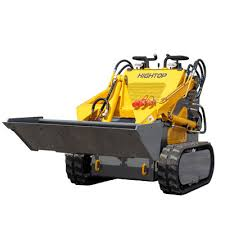
As a loader supplier, we offer a variety of high - quality loaders, including those for different types of machinery. Check out our Telescopic Arm Front End Bucket Loader, which provides excellent reach and versatility for various loading tasks. Our Skid Steer Track Loader is known for its maneuverability and power, making it ideal for tight spaces. And for smaller projects, our Mini Crawler Hydraulic Loader offers precision and efficiency.
Configuration of Sass Loader in Webpack
To use a Sass loader in Webpack, you need to configure it in your webpack.config.js file. Here is a basic example of how to configure the Sass loader along with the style - loader and css - loader:
const path = require('path');

module.exports = {
    entry: './src/index.js',
    output: {
        path: path.resolve(__dirname, 'dist'),
        filename: 'bundle.js'
    },
    module: {
        rules: [
            {
                test: /\.scss$/,
                use: [
                    'style - loader',
                    'css - loader',
                    'sass - loader'
                ]
            }
        ]
    }
};
In this configuration, the test property uses a regular expression to match all .scss files. The use property specifies the loaders to be used in the pipeline, and they are applied from right to left. So, the sass - loader is applied first, followed by the css - loader, and then the style - loader.
Best Practices for Using Sass Loader in Webpack
-
Source Maps: Enable source maps in your Webpack configuration to make debugging easier. Source maps allow you to map the compiled CSS back to the original Sass files, so you can quickly find and fix issues in your stylesheets.

-
Caching: Use caching techniques to speed up the build process. Webpack has built - in caching capabilities, and you can also use tools like
cache - loaderto cache the results of the Sass compilation. -
Separation of Concerns: Keep your Sass files organized by separating different concerns. For example, create separate files for variables, mixins, and component - specific styles.
Conclusion
In conclusion, a Sass loader in Webpack is a powerful tool that allows you to use Sass in your web projects efficiently. It combines the benefits of Sass's advanced features with Webpack's module bundling capabilities, making your development process more modular, efficient, and maintainable.
If you're interested in learning more about our loaders or are looking to make a purchase, we're here to assist you. Whether you need a loader for your web development projects or for heavy - duty machinery, we have the solutions you need. Contact us to start a procurement discussion and find the best loader for your specific requirements.
References
- Webpack official documentation
- Sass official documentation
- Various online web development resources


